What is Google Business Profile and Why Every Dakshina Kannada Business Needs One
Google Business Profile is not optional for local businesses in Dakshina Kannada — it is the foundation of local digital visibility. It determines whether your business appears when customers nearby are actively searching for what you offer. It is free, it is powerful, and the majority of your competitors have not optimised it properly — which means it is one of the highest-opportunity actions you can take right now. Set it up. Verify it. Fill every section. Add photos. Ask for reviews. Post updates. And if you want expert help doing it right the first time, NammoraX is right here in Puttur — and we know this market better than anyone.
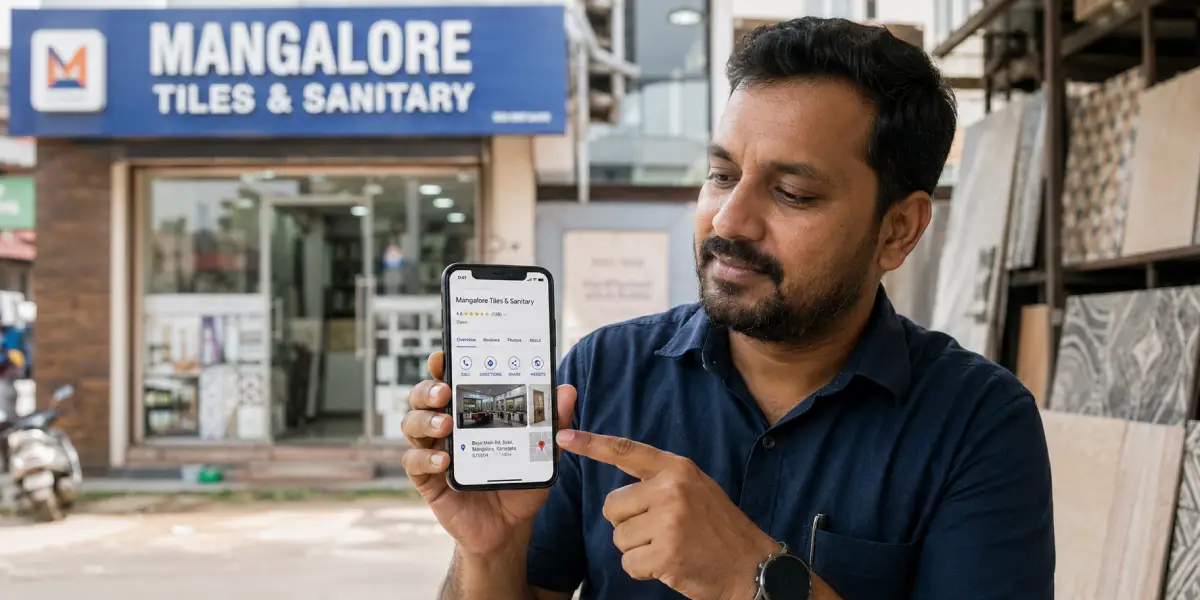
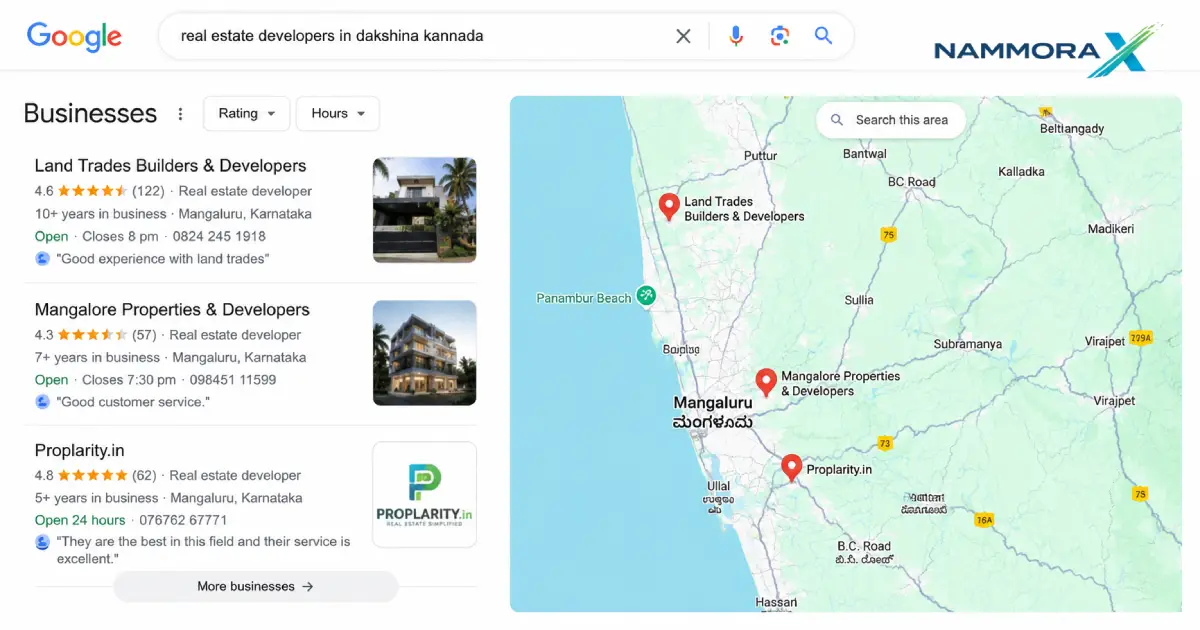
When someone in Puttur searches "bakery near me" on Google, three businesses appear in a special box at the top of the results — above all the website links. They show a name, a star rating, photos, opening hours, and a button to call or get directions. That box is powered entirely by Google Business Profile.
If your business is not in that box, you are invisible to the most ready-to-buy customers in your area.
This guide explains what Google Business Profile is, why it is one of the most powerful free tools available for businesses in Dakshina Kannada, and exactly how to set it up. Whether you run a hotel in Mangaluru, a textile shop in Bantwal, a clinic in Sullia, or a coaching centre in Puttur — this is the single most important digital step you can take today.
What Exactly is Google Business Profile?
Google Business Profile (GBP) — formerly called Google My Business — is a free tool by Google that lets you manage how your business appears across Google Search and Google Maps.
When you complete your profile, Google shows a dedicated panel about your business whenever someone searches for you by name or by the type of business you run. This panel is called the local pack or map pack, and it typically appears before any organic website results.
Your Google Business Profile displays:
- Your business name, category, and description
- Address, directions, and a map pin
- Phone number and website link
- Opening hours (including special holiday hours)
- Customer reviews and your responses to them
- Photos of your shop, products, team, or services
- Q&A section where customers can ask questions
- Posts (offers, announcements, events)
- Booking or appointment links
All of this is free. You do not need to run Google Ads to appear in the map pack. You just need a verified, well-optimised profile.
Why Google Business Profile Matters More in Dakshina Kannada Than You Think
The way people in Dakshina Kannada find local businesses has changed completely in the last five years. Before booking a restaurant in Mangaluru, visiting a clinic in Puttur, or hiring a contractor in Bantwal, most customers now do two things: search on Google and check reviews.
Here is why GBP is especially important for businesses in our region.
1. "Near me" searches have exploded
Searches like "hardware shop near me", "AC repair Puttur", "best fish restaurant Mangaluru" are now among the most common Google queries in coastal Karnataka. Google uses your Business Profile location to decide whether to show your business for these searches. Without a profile, you simply cannot rank for them — your website alone is not enough.
2. Your customers are deciding before they visit
A customer walking into your shop has already made a decision online. They checked your rating, read a couple of reviews, looked at your photos, and confirmed your timing. If your profile was incomplete or missing, they likely visited a competitor who had a better-looking profile — even if your actual business is superior.
3. Dakshina Kannada's business landscape is competitive
Whether it is Puttur's growing market for gold jewellery and construction material, Mangaluru's dense restaurant and hospitality sector, or Udupi's tourism-driven retail — every category in coastal Karnataka has more businesses competing for the same local customer. GBP is how you win that visibility battle without spending on ads.
4. It directly affects Google Maps rankings
When someone opens Google Maps and searches for a plumber, salon, or clinic in your area, the results they see are businesses with active, verified Google Business Profiles. No profile means no Maps presence. That is a significant channel to lose, especially since many people in Karnataka use Google Maps for navigation and discovery simultaneously.
The Local Pack: The Most Valuable Real Estate on Google
Before we go further, it is worth understanding exactly what you are competing for.
When someone searches for a local business on Google, they typically see:
- Google Ads (paid results at the top)
- The Local Pack — a map with 3 business listings highlighted
- Organic website results below
The local pack almost always appears before any organic results for searches with local intent. Studies consistently show that the majority of clicks on local searches go to businesses in the local pack — not to websites ranked #1 organically.
This means a business with a strong Google Business Profile but a simple website can outperform a business with an expensive, well-designed website but a neglected profile. For small businesses in Dakshina Kannada that may not yet have the budget for extensive SEO campaigns, GBP is the highest-return investment available.
What Industries in Coastal Karnataka Benefit Most from GBP?
Virtually every local business benefits, but the impact is especially strong in:
Restaurants, cafes, and hotels — Food-related searches in Mangaluru, Udupi, and Puttur are extremely high-volume. A restaurant with 4.5 stars, fresh photos, and updated hours will consistently outperform one with no profile at all.
Healthcare — clinics, dentists, physiotherapists, Ayurvedic centres — Patients search for nearby doctors before travelling. A profile showing your specialisation, timings, and positive reviews builds trust before the first appointment.
Retail shops — textiles, jewellery, electronics, building materials — Customers often browse online before visiting a physical store. Your profile is your digital shop window on Google Maps.
Education — coaching centres, schools, skill institutes — Parents and students searching for courses in a specific area rely heavily on GBP listings, ratings, and photos.
Services — plumbers, electricians, AC technicians, painters, contractors — These are exactly the "urgent need" searches where someone picks the first credible-looking result on Maps.
Real estate and construction — Developers in Bantwal, Puttur, and Mangaluru who maintain active profiles with project photos and regular posts stay top of mind for property seekers.
How Google Ranks Businesses in the Local Pack
Google uses three core factors to decide which businesses appear in the local pack:
Relevance — Does your business profile match what the customer searched for? This is why your business category, description, and services must be accurate and detailed.
Distance — How close is your business to the searcher, or to the location they specified? Businesses physically closer to the searcher tend to rank higher, which is why having a correct, verified address matters enormously.
Prominence — How well-known and trusted is your business? This is influenced by the number and quality of your reviews, how often you post updates, whether your profile is complete, and how many times your business is mentioned online elsewhere.
Of these three, Prominence is the one you can influence most actively — through consistent reviews, complete profile information, photos, and posts. That is where a focused local SEO strategy pays off.
Setting Up Your Google Business Profile: A Step-by-Step Guide
If you have not yet created or claimed your Business Profile, here is how to do it correctly.
Step 1: Go to the Google Business Profile page
Visit business.google.com and sign in with a Google account. Use a permanent business email rather than a personal Gmail to keep your profile professionally managed.
Step 2: Search for your business name
Google will check if a profile already exists for your business. Sometimes profiles are auto-generated from data Google collects — you need to claim these rather than create duplicates.
If your business appears, click "Claim this business." If not, click "Add your business to Google."
Step 3: Choose the right primary category
This is one of the most important decisions in your setup. Your category tells Google what type of business you are, which determines what searches you appear for.
Be precise. "Restaurant" is too broad — choose "South Indian Restaurant" or "Seafood Restaurant" if applicable. "Clinic" is too broad — choose "General Practitioner" or "Ayurvedic Clinic." You can add secondary categories later.
Step 4: Add your location
If you serve customers at a physical location, add your full, precise address. Make sure it matches your address on your website and other online directories exactly — including how you abbreviate road names and whether you write "Karnataka" or "KA."
If you are a service-area business (a plumber, caterer, or consultant who travels to clients), you can hide your address and instead list the areas you serve.
Step 5: Add your contact details
Add your primary phone number and your website URL. If you do not have a website yet, Google allows you to create a basic free website from your profile — though a dedicated website will always give you better results.
Step 6: Verify your business
Google needs to confirm that your business is real and that you are its owner. Verification methods include:
- Postcard by mail — Google sends a card with a PIN to your business address (most common, takes 5–14 days)
- Phone or SMS verification — Available for some businesses, instant
- Video verification — Google may ask you to record a short video showing your business
- Email verification — Available in some cases
Do not skip verification. Unverified profiles have very limited visibility and cannot be fully managed.
Step 7: Complete every section of your profile
Once verified, fill in every available field:
- Business description (750 characters) — Write naturally, include your town and services, but do not stuff keywords awkwardly
- Opening hours — Be precise, including whether you close for lunch
- Special hours — Add holiday closures and festival hours
- Services — List every service you offer with brief descriptions
- Attributes — Select applicable attributes ("wheelchair accessible", "women-led", "free Wi-Fi", etc.)
- Photos — See the next section
Photos: The Most Underused Part of GBP in Karnataka
Businesses with photos receive dramatically more requests for directions and clicks to their website than those without. Yet the majority of business profiles in Dakshina Kannada either have no photos or only one blurry exterior shot.
Here is what to upload for maximum impact:
Cover photo — Your best image. For a restaurant, this is a signature dish or your interior. For a shop, your storefront or best display. This appears prominently across your profile.
Logo — Upload a clean, square version of your logo.
Interior photos — Show customers what to expect when they walk in. For clinics, this builds trust. For restaurants, it creates appetite. For shops, it shows your range.
Product or service photos — A jewellery shop should show its collections. A mechanic should show work in progress. A builder should show completed projects.
Team photos — People trust businesses where they can see the faces behind them.
Regular updates — Add new photos at least once a month. Google notices recency.
Avoid stock photos entirely. Google can detect them, and customers appreciate authenticity over polish.
Google Reviews: The Currency of Local Trust in Dakshina Kannada
Reviews are arguably the most powerful element of your Google Business Profile. They influence both your ranking in the local pack and the likelihood that a customer chooses you over a competitor.
Here is what the numbers look like: a business with 4.4 stars and 85 reviews will almost always outperform one with 4.8 stars and 3 reviews in both rankings and customer trust. Volume matters alongside quality.
How to get more reviews ethically
Ask every satisfied customer directly. After a successful appointment, a delivered order, or a completed project, say: "We'd really appreciate it if you left us a review on Google — it helps us a lot." Then send a WhatsApp message with a direct link to your review page.
To get your review link: go to your Business Profile manager, click "Ask for reviews," and copy the short link. Pin it to the top of your WhatsApp Business status, add it to your invoice footer, and place a small printed card at your checkout counter.
Never buy fake reviews or ask friends to post reviews from the same location — Google's systems detect these patterns and can penalise or suspend your profile.
Responding to reviews
Respond to every review — positive and negative. For positive reviews, thank the customer personally and mention something specific. For negative reviews, respond calmly, acknowledge the concern, and invite them to contact you to resolve it. Never argue publicly.
Your responses are read by potential customers just as much as the reviews themselves. A business that responds thoughtfully to criticism appears more trustworthy than one that ignores it.
Google Posts: A Free Way to Stay Active and Relevant
Most business owners set up their profile and never return. The ones who consistently outperform their competitors do one extra thing: they post regularly.
Google Posts are short updates (like social media posts) that appear directly on your Business Profile. You can use them to share:
- Offers and discounts — "20% off all saree collections this week at our Puttur store"
- Events — "Free eye check-up camp at our Mangaluru clinic, 15th June"
- New products or services — "We now offer home delivery across Bantwal"
- Announcements — "Extended hours during summer for all our Sullia customers"
Posts expire after 7 days (event posts after the event date), which gives you a natural reason to keep adding new content. Each post can include a photo, a description, and a call-to-action button.
Posting at least twice a month signals to Google that your business is active and engaged — which feeds into the Prominence ranking factor.
Common Mistakes That Businesses in Dakshina Kannada Make with GBP
Understanding what not to do is as important as knowing what to do.
Inconsistent business name, address, and phone (NAP) — If your name is "Sri Ganesh Hardware" on Google but "S G Hardware Stores" on Justdial and "Ganesh Hardware & Tools" on your visiting card, Google's confidence in your listing drops. Consistency across every platform matters.
Wrong or outdated opening hours — Customers who arrive at a closed shop based on incorrect GBP hours are the most likely to leave a negative review. Update your hours whenever they change, including for festivals and public holidays.
Ignoring the Q&A section — Customers can ask questions on your profile — and anyone can answer them. If you do not monitor and answer yourself, a competitor or an uninformed person might answer instead. Check this section weekly and pre-populate it with common questions.
Choosing too broad a category — "Store" or "Business" tells Google almost nothing. Be as specific as possible with your primary category.
Not adding products and services — The Products and Services sections are free real estate that directly feeds what searches you appear for. Use them fully.
Never requesting reviews — Waiting for reviews to come naturally is too slow. Build a simple system for asking every customer, and your review count will grow steadily.
How NammoraX Helps Businesses in Dakshina Kannada with GBP and local SEO
At NammoraX, we work exclusively with businesses across Puttur, Mangaluru, Bantwal, Sullia, Udupi, and the surrounding coastal Karnataka region. Google Business Profile setup and optimisation is one of the first things we do for every new client — because it delivers visible results faster than almost anything else.
Our GBP service includes complete setup or audit of your existing profile, category research, photo guidance, review strategy, and ongoing monthly management with posts and updates. We also make sure your profile is consistent with your website and other local citations so that Google's confidence in your listing is as high as possible.
If you already have a profile and are not sure whether it is performing well, we offer a free local SEO audit where we review your profile against the top competitors in your category and area — and tell you exactly what needs to be fixed.
The One Thing to Do Today
If you have read this far and still do not have a verified Google Business Profile, open business.google.com right now and begin the setup. It takes about 20 minutes to fill in the basics, and the verification postcard will arrive within two weeks.
If you already have a profile, check three things today:
- Are your opening hours correct?
- Do you have at least 10 photos uploaded?
- Have you responded to every review in the last 30 days?
These three actions alone, done consistently, will move your profile ahead of the majority of your competitors in Dakshina Kannada.
Frequently Asked Questions
Is Google Business Profile really free?
Yes, completely. There is no charge to create, verify, or manage your profile. Google offers it free because it makes Google Maps and Search more useful for searchers.
Do I need a website to create a Google Business Profile?
No. A website is recommended, but GBP works independently. If you do not have a website, we strongly suggest building one — it significantly strengthens your overall local SEO performance.
What if someone else claimed my business profile?
This happens occasionally. Google has an ownership dispute process where you can request ownership. Contact us if you need help navigating it.
Can I manage multiple locations from one account?
Yes. If you have branches in Puttur, Mangaluru, and Bantwal, each location gets its own profile — and all can be managed from a single Google Business Profile account.
How soon will I see results after setting up GBP?
Verification takes up to 14 days. Once verified, your profile typically becomes visible within a few days. Ranking improvements accumulate over weeks and months as you gather reviews, add content, and build profile completeness.
What if I get a fake or unfair negative review?
You can flag reviews that violate Google's policies (fake, spam, or irrelevant content) for removal. Google does not always remove them quickly, but responding calmly and professionally is always the right move in the meantime.
NammoraX is a full-service digital agency based in Puttur, Dakshina Kannada, Karnataka. We specialise in local SEO, web design, and digital marketing for small and medium businesses across coastal Karnataka. Book a free consultation to get started.